![ID-logo-colour_version_2.png]](https://answers.id.com.au/hs-fs/file-2628100188-png/images/ID-logo-colour_version_2.png?height=40&name=ID-logo-colour_version_2.png)
Before You Begin
Only councils who have a current subscription to Housing Monitor will appear in searches, so if the council you are looking for doesn’t appear you can reach out to them to enquire about a subscription – they may have one on the way, or be part of a larger regional group.
Steps
In your browser search bar type housing .id and the council you wish to search for ie: housing .id Geelong. The councils housing monitor site from .id informed decisions will be one of the first listings that the search returns.
Alternatively,
1. Go to the Housing Monitor directory: Enter https://housing.id.com.au in your browser. The directory page opens with the ‘housing.id’ banner and, below the page heading, a grid of council tiles. Each tile shows a council logo with the council name beneath it.
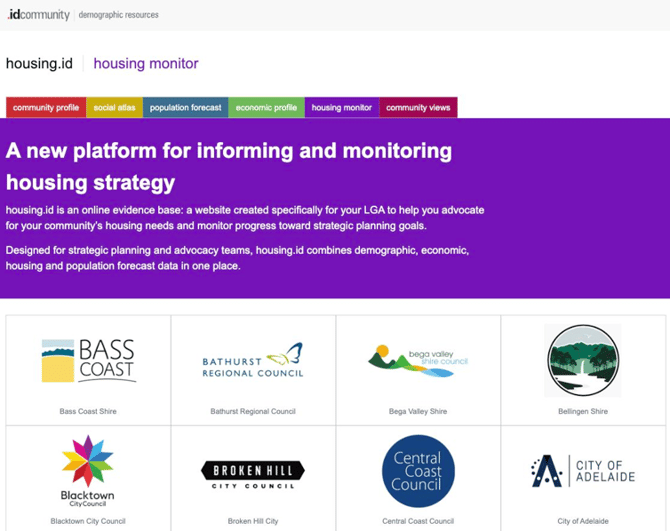
2. Scroll to your council: Councils appear in alphabetical order by name or you can Your browser’s find function (Ctrl+F, or Cmd+F on a Mac).
3. Click the council’s tile: Click the tile showing the council’s name, the site opens in the same browser tab.
What to Expect
Your council’s Housing Monitor site opens with the council’s name in the site banner, followed by ‘housing monitor’. For example, clicking the ‘City of Greater Geelong’ tile opens housing.id.com.au/geelong/. The banner reads ‘City of Greater Geelong’ with the council’s logo at the top right, and the heading reads ‘Explore the housing story for City of Greater Geelong’. A navigation menu on the left lists housing topics starting with ‘Home’, ‘Housing Demand’ and ‘Housing Supply’, and the main panel shows dashboard summary tiles.
Troubleshooting
If you can’t see your council in the grid use the ‘Add your community’ tile at the end of the grid to ask about a site for your council.
Once your council’s site is open, read What is Housing Monitor? to learn what the site includes and how to use it.
Related Articles
What is Housing Monitor?
What is housing stress and how is it measured in Housing Monitor?