![ID-logo-colour_version_2.png]](https://answers.id.com.au/hs-fs/file-2628100188-png/images/ID-logo-colour_version_2.png?height=40&name=ID-logo-colour_version_2.png)
Use this guide to open population forecast data in Placemaker, set the year and geography, then read the result on the map.
Before You Begin
- You need an active Placemaker account with access to population forecast data.
- Your organisation needs a subscription to the National Forecasting Program (NFP).
- If you're not sure what data you can access, see Understanding your data access in Placemaker.
Steps
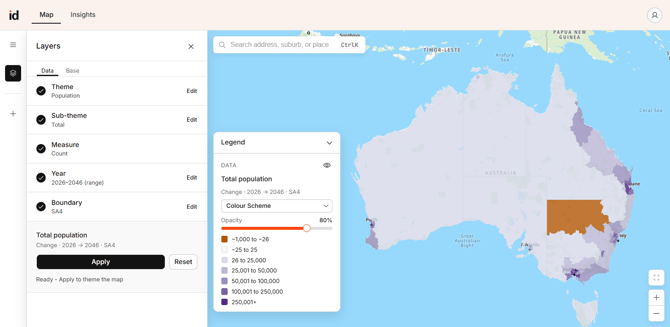
- Open the Layers panel. On the left toolbar, click the Layers icon. The panel opens on the Data tab.
- Choose a theme. Under Theme, select 'Population'. Select 'Dwellings' instead if you want dwelling forecasts.
- Choose a sub-theme. Select 'Total' for the whole population, or 'Age range' to focus on a specific age group.
- Check the measure. Placemaker sets the Measure for you based on the sub-theme, for example 'Count'.
- Set the year. Under Year, choose 'Single year' for one point in time or 'Year range' to compare across years, then pick your forecast year from the list.
- Choose a boundary. Under Boundary, select the geography you want: SA1, SA2, Suburb and Locality, Local Government Area, SA3 or SA4. Finer geographies show more local variation.
- Apply the layer. Click 'Apply' to theme the map. Each area is shaded by the measure you chose.
What to Expect
The map shades each area by the measure you chose, with darker shading for higher values. The legend shows the layer title, the measure, year and boundary, a colour scheme, an opacity slider and the value ranges. Use the eye icon in the legend to show or hide the data layer.
Use this view to see where population is concentrated or growing before you build a catchment.
Troubleshooting
- Population data isn't showing: check that your Placemaker subscription includes National Forecasting Program data. If a step is greyed out or the map does not theme, contact .id support to confirm your entitlements.
- The geography I need isn't available: not all geographies are available for every dataset. If a boundary is missing, see Understanding population and dwelling forecasts in Placemaker.
Related Articles
- How to view population forecast data by geography in Placemaker
- How to identify areas of population growth in Placemaker
- Understanding population and dwelling forecasts in Placemaker